
The Manage Team feature in cPanel allows you to create and manage team users (subaccounts) who can log in and access specific areas of your hosting account. This is useful when you want to grant limited access to developers, designers, or other collaborators without sharing your main cPanel credentials.
Why Use Manage Team?
-
Provide secure, limited access to third‑party collaborators.
-
Assign roles such as Database, Email, or Web.
-
Control services like FTP, Web Disk, and email access.
-
Monitor team activity with an audit log.
Accessing the Manage Team Feature
-
Log in to cPanel.
-
On the Tools page → Preferences section, click Manage Team.
-
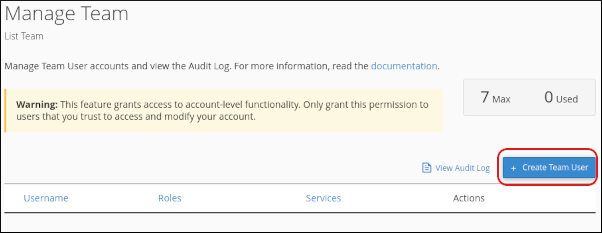
The Manage Team page appears, showing existing team users and options to add new ones.
Creating a Team User
-
On the Manage Team page, click Create Team User.
-
Fill in the following details:
-
Username → Format:
username@example.com.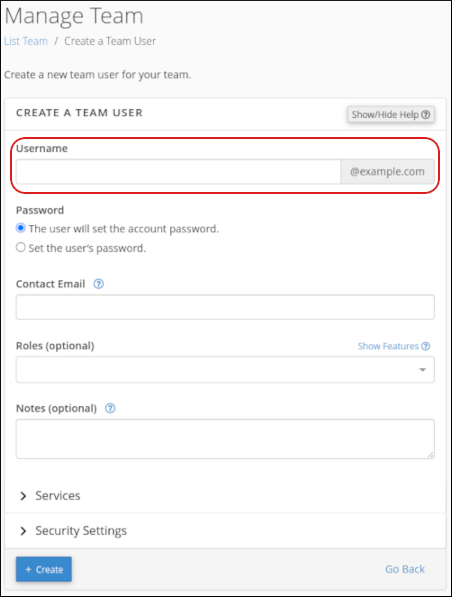
-
Password → Choose whether the user sets their own password or you generate one.
-
Contact Email → Enter the user’s email address.
-
Roles → Assign roles:
-
Administrator → Full access to Database, Email, and Web roles.
-
Database → Access to database management tools.
-
Email → Access to email administration tools.
-
Web → Access to website functionality tools.
-
-
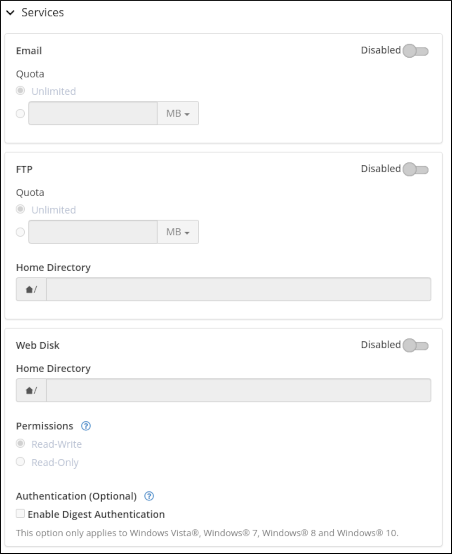
Services → Enable or disable access to Email, FTP, and Web Disk.
-
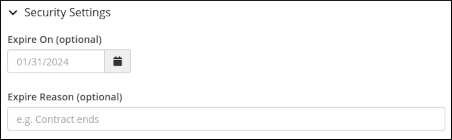
Security Settings → Optionally set an expiration date for the account.
-
-
Click Create.
-
The new team user is added and can log in with their credentials.
Managing Team Users
-
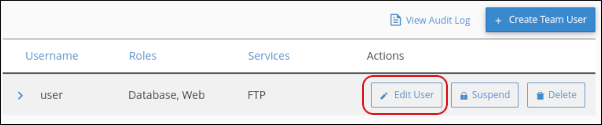
Edit User → Update roles, services, or contact details.
-
Suspend/Unsuspend User → Temporarily disable or re‑enable access.
-
Delete User → Permanently remove a team member.
-
Audit Log → View team user activity for security monitoring.
Notes
|


