
Managing Billing in the Ruachost Hosting Panel
The Billing section of your Ruachost hosting panel allows you to view invoices, manage payment methods, and keep track of your financial activity. This guide walks you through the key billing features.
Accessing Billing
To access billing options:
-
Log in to your Ruachost Hosting Panel.
-
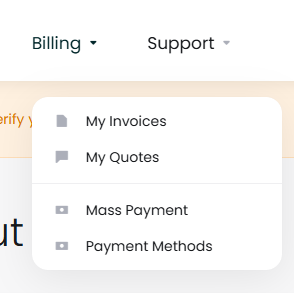
In the top navigation, click Billing.
-
A dropdown menu will appear with options such as My Invoices, My Quotes, Mass Payment, and Payment Methods.
My Invoices
The My Invoices page lists all invoices associated with your account.
Here you can:
-
View invoice numbers, dates, due dates, totals, and payment status
-
Search for invoices using the search bar
-
Open an invoice to see full details
-
Download or print invoices for your records
My Quotes
The My Quotes section displays any quotes issued for services you may want to purchase.
-
Review pending quotes
-
Accept a quote to convert it into an order
-
Decline a quote if you no longer need the service
Payment Methods
The Payment Methods page allows you to securely store and manage your preferred payment options.
-
Add a new credit or debit card
-
Update existing card details
-
Remove outdated payment method.
If no payment methods are saved, you’ll see the option to Add New Credit Card.
Mass Payment
The Mass Payment feature allows you to pay multiple invoices at once. This is useful if you have several outstanding invoices and want to settle them in a single transaction.


